Guide · 1 November 2026
FM27 edit club rivalries: add a rival, remove one, set the intensity
To edit club rivalries in FM27, open the club in MacLibero RT, go to its “Facilities” tab and use the “Rivalries and relationships” card: change a rival's intensity, add a rival with “Add a rival: club name” or remove one, keep “Both ways (the rival too)” ticked, then click “Apply to game”. After a save and reload, Football Manager 27 shows the new rivalry in the club's information.
Rivalries give a fixture its edge in Football Manager 27: derbies, fan expectations, the weight of a win. But the game decides them for you. MacLibero RT, the native Mac app that reads and edits your single-player FM 27 save, lets you create the rivalry your story needs, end an old one, or turn an existing one up or down.
How do you edit club rivalries in FM27?
- Open MacLibero RT, click “Launch FM 27”, load your save, then click “Refresh from game” (⌘R).
- Open the club, for example from “Clubs”, and go to its “Facilities” tab.
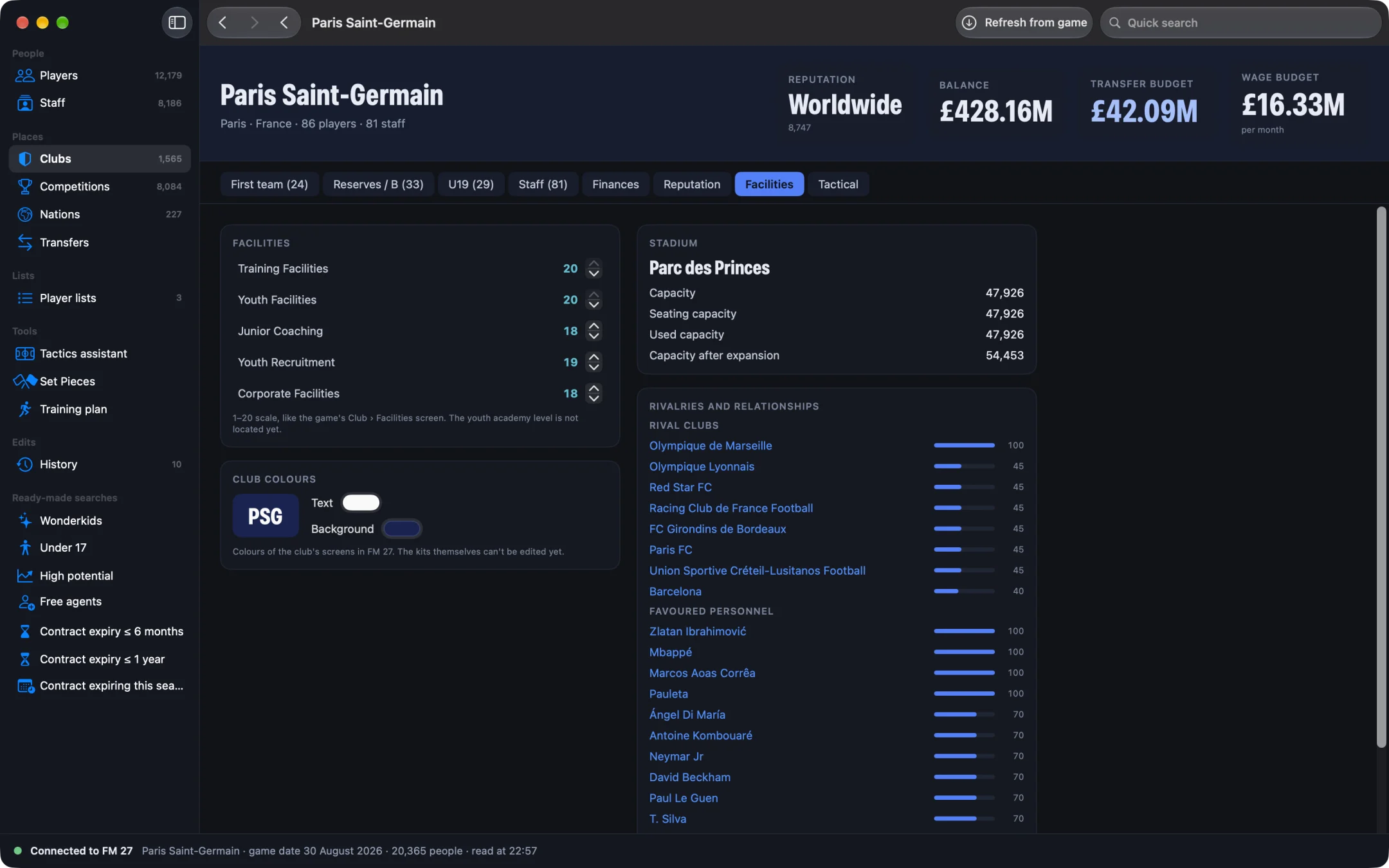
- Find the “Rivalries and relationships” card. Under “Rival clubs”, each rival is listed with its intensity, from 0 to 100.
- Use the arrows next to a rival to change its intensity, in steps of 5. The old value stays visible (“45 →”) until you apply.
- Leave “Both ways (the rival too)” ticked to change the other club as well.
- Click “Apply to game (n)”, where n is the number of changes, or “Cancel”.
- In FM 27, save and reload your game, then open the club's information: the rivalry is shown under Rivalries.
How do you add a new rival?
Type at least two letters of the club in “Add a rival: club name”, then click the club in the list (the best-known clubs come first). It joins the list marked “new”, at intensity 50, which you can adjust before applying. A club that already has another kind of relationship with yours (favourite or disliked club) isn't offered. Women's clubs are left out of the search, so you always land on the men's team.
How do you remove a rivalry?
Click the cross next to the rival (“Remove this rival”). The name is struck through and marked “removed”; click the arrow if you change your mind, or “Apply to game” to confirm. With “Both ways (the rival too)” ticked, the other club stops seeing you as a rival too.
Why “both ways”?
In FM 27 each club stores its own list of rivals: PSG can see Marseille as a rival, and Marseille sees PSG separately, with its own intensity. That's why the app offers “Both ways (the rival too)” and ticks it by default: one click writes the rivalry for both clubs, and both lines appear in History, each as “Rivalry with” the other club. Untick it if you want a one-sided rivalry.
Does the rivalry stay after playing on?
Yes. In our test on a copy of a PSG save, we made PSG and Lille rivals both ways. We then played a week including a match, saved, and reloaded: the rivalry was still there. As the card notes, the game itself updates rivalries at the start of each season, so it can still move them later, like any rivalry in the database.
Rivalries sit in the same tab as the club's facilities, which you can edit too: see how to edit club facilities in FM27.
What happens if the game changes the rivalry at the same time?
Nothing is written. MacLibero RT checks the current value just before writing: if the game has changed it since your last refresh, the change is refused and your save is left alone. The same goes for a rival that already exists: adding it twice is refused. We tested both refusals. Refresh (⌘R) and try again.
Can you undo a rivalry change?
Yes. Each “Apply to game” is a single batch in History. In our test we set PSG ↔ LOSC to 50 from the app, then clicked “Undo batch”: both clubs went back to exactly their previous lists of rivals. See how to undo editor changes in FM27.
Single-player saves only. Keep a copy of any save you care about before editing it.
What you need
Writing needs a licence: €6.99 once for FM27, on up to 3 Macs (see pricing and the FM27 Mac editor comparison). Adding or removing a rival goes through the game's own main loop, so it works on Apple Silicon Macs with the current FM 27 build. Relationships between people (liked and disliked people) are shown in the same card, read-only for now.
Questions
How do I edit club rivalries in FM27 with MacLibero RT?
Open the club, go to the “Facilities” tab and use the “Rivalries and relationships” card: change the intensity, add a rival or remove one, then click “Apply to game”.
Can I create a new rivalry in Football Manager 27?
Yes. Type the club's name in “Add a rival: club name”, pick it, set the intensity and apply. In our test, PSG and Lille became rivals and stayed so after a week of play, a match, a save and a reload.
What does “Both ways” do?
Each club stores its own rivalries. With “Both ways (the rival too)” ticked, which is the default, MacLibero RT writes the rivalry for both clubs, so Lille sees PSG as a rival too.
When does the new rivalry show in FM 27?
After you save and reload your game: it then appears under Rivalries in the club's information. The game itself still updates rivalries at the start of each season.
Can I undo a rivalry change?
Yes. Open History and click “Undo batch”: in our test, both clubs went back to exactly their previous rivals.