Guide · 31 October 2026
FM27: freeze player attributes, CA, PA, fitness and morale
To freeze player attributes in FM27, open the player's profile in MacLibero RT, click the “Freeze” menu and choose “Freeze all attributes” or “Freeze CA and PA”. As soon as Football Manager 27 changes a frozen value, MacLibero RT puts it back: in our test, an attribute changed by the game was back to its value in under 3 seconds.

You raised your wonderkid's CA, tuned your striker's attributes, and a few weeks later the game brings them down again: age-related decline, an injury, a lack of game time. In FM 27, an edited value does not necessarily stay put. The freeze in MacLibero RT, the native Mac app that reads and edits your single-player save, stops the game from changing it.
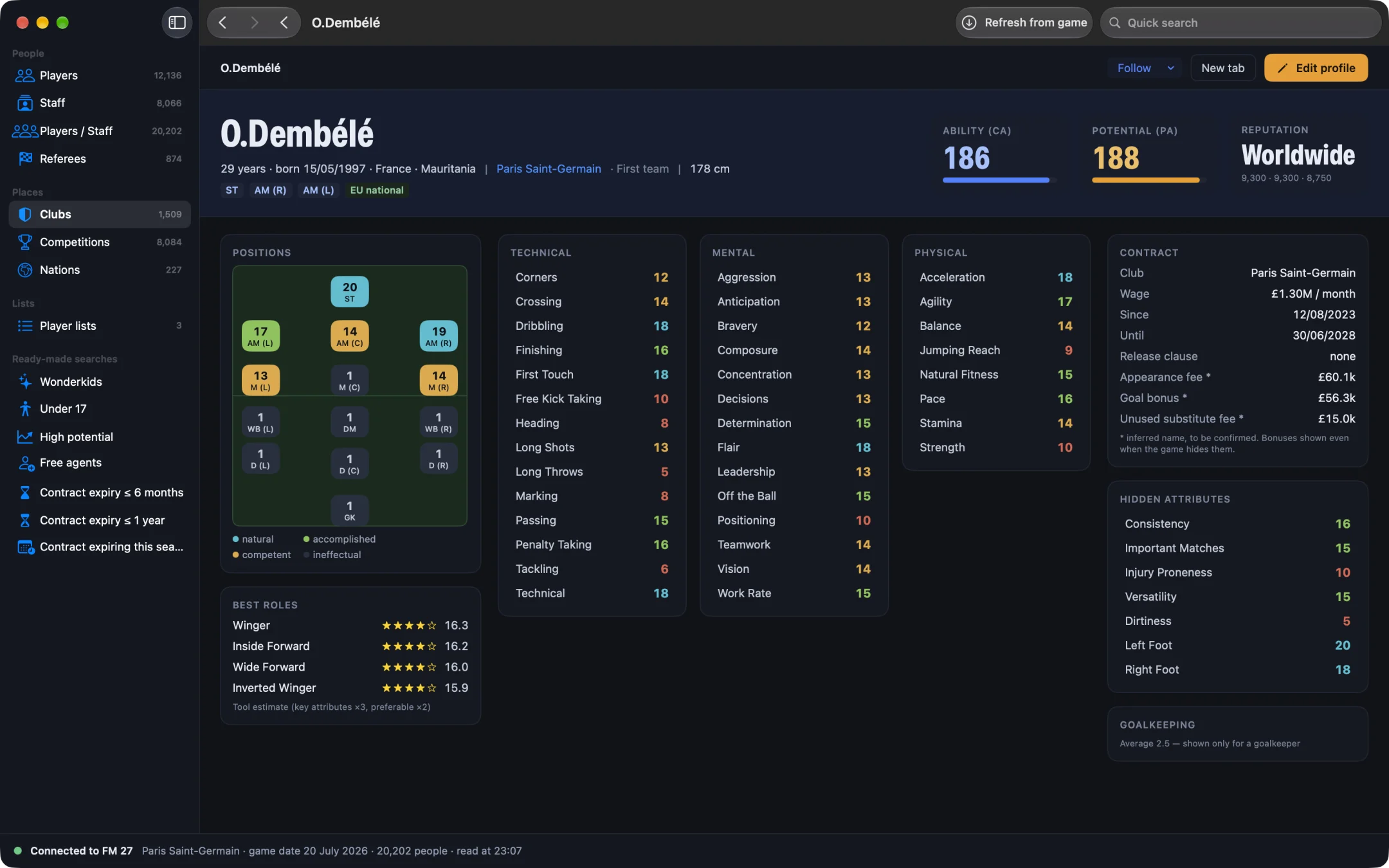
How do you freeze player attributes in FM27?
- Open MacLibero RT, click “Launch FM 27”, load your save, then click “Refresh from game” (⌘R).
- Open the player's profile. If you want to change values first, use “Edit profile”, then “Apply to game”.
- At the top of the profile, click the “Freeze” menu (snowflake icon).
- Under “Current values”, choose “Freeze all attributes”, “Attributes: rise only” or “Freeze CA and PA”.
- A message confirms how many values were frozen. The menu now reads “Frozen” followed by that number.
A freeze takes the player's current values. To keep a value you have just edited, apply the edit first, then freeze. Hover over the “Frozen” menu: its tooltip lists each frozen value, with “=” for a fixed value and “≥” for a floor.
What can you freeze?
The “Freeze” menu has two parts.
- “Current values”: “Freeze all attributes” (technical, mental, physical, goalkeeping and hidden ones), “Attributes: rise only” and “Freeze CA and PA”.
- “At maximum”: “Always fully fit” (condition and match sharpness held at 100%) and “Morale always at its best”.
To restore fitness or morale just once, without a freeze, the profile's fitness card is enough: see heal injured players and restore fitness in FM27.
Freeze or “rise only”: what is the difference?
“Freeze all attributes” locks the values: they no longer move, down or up. So your player stops improving in training.
“Attributes: rise only” sets a floor: “The game can make the player improve, never decline.” It is the right choice for a youngster you want to see grow with no risk of going backwards, or for a player in his thirties whose physical decline you want to avoid.
“Freeze CA and PA” keeps current and potential ability, out of 200. Combined with create a wonderkid in FM27, it keeps the PA you chose.
How long does a freeze last in FM 27?
As long as FM 27 is running, MacLibero RT checks the frozen values every second and puts back any the game has changed. As the app's message says, this works whether the app is open or not. In our test, an attribute changed by the game was restored in under 3 seconds.
MacLibero RT keeps freezes player by player. After you reload the save or restart FM 27, they are sent back to the game on the next read of the save (“Refresh from game”, ⌘R). Up to 512 values can be frozen at the same time.
How do you unfreeze a player?
Open the profile's “Frozen” menu and click “Unfreeze all” (the number of frozen values is shown in brackets). A message confirms the values were unfrozen. Nothing is reset to an old value: each value stays where it is, and the game can move it again.
A freeze does not go through History: you remove it with “Unfreeze all”, not with undo. An edit you made before freezing can still be undone, though: see undo an edit in FM27. If you undo a value that is still frozen, unfreeze first, or the app will put it back.
Single-player saves only. Keep a copy of any save you care about before editing it.
What you need to freeze values
MacLibero RT's scouting is free. Freezing writes to the game, so it needs a licence: €6.99 once for FM27, on up to 3 Macs (see pricing and the FM27 Mac editor comparison).
Questions
Can you freeze a player's attributes in FM27?
Yes, with MacLibero RT on Mac: on the player's profile, the “Freeze” menu offers “Freeze all attributes” and “Freeze CA and PA”. If the game changes a frozen value, the app puts it back; in our test, in under 3 seconds.
Can a frozen player still improve?
With “Freeze all attributes”, no: the value stays fixed. Pick “Attributes: rise only” instead: the game can make the player improve, never decline.
How do you unfreeze a player?
Open the menu, which now reads “Frozen” followed by the number of values, and click “Unfreeze all”. The values stay where they are, and the game can change them again.
Does a freeze survive reloading the save?
Yes. MacLibero RT keeps your freezes and sends them back to the game after every read of the save, even after a reload or a restart of FM 27.
Do I need a licence to freeze values?
Yes: freezing writes to the game, which needs a MacLibero RT licence, €6.99 once for FM27, on up to 3 Macs. Scouting stays free.