Guide · 31 October 2026
FM27 unhappy player fix: happiness, status and personality
To fix an unhappy player in FM27, open his profile in MacLibero RT and click “Inspire” in the “Personality and status” card: his concerns are closed, his morale goes to 20, his happiness to 100 and his cohesion to 100. The same card changes his personality, his “Promised playing time” and his “Transfer status”. Everything can be undone from History, except closing the concerns.
In Football Manager 27, an unhappy player drags the whole dressing room down: falling morale, falling ratings. MacLibero RT, the native Mac app that reads and edits your single-player FM 27 save, shows you where the problem comes from and fixes it in one click.
How do you fix an unhappy player in FM27?
- Open MacLibero RT, click “Launch FM 27”, load your save, then click “Refresh from game” (⌘R).
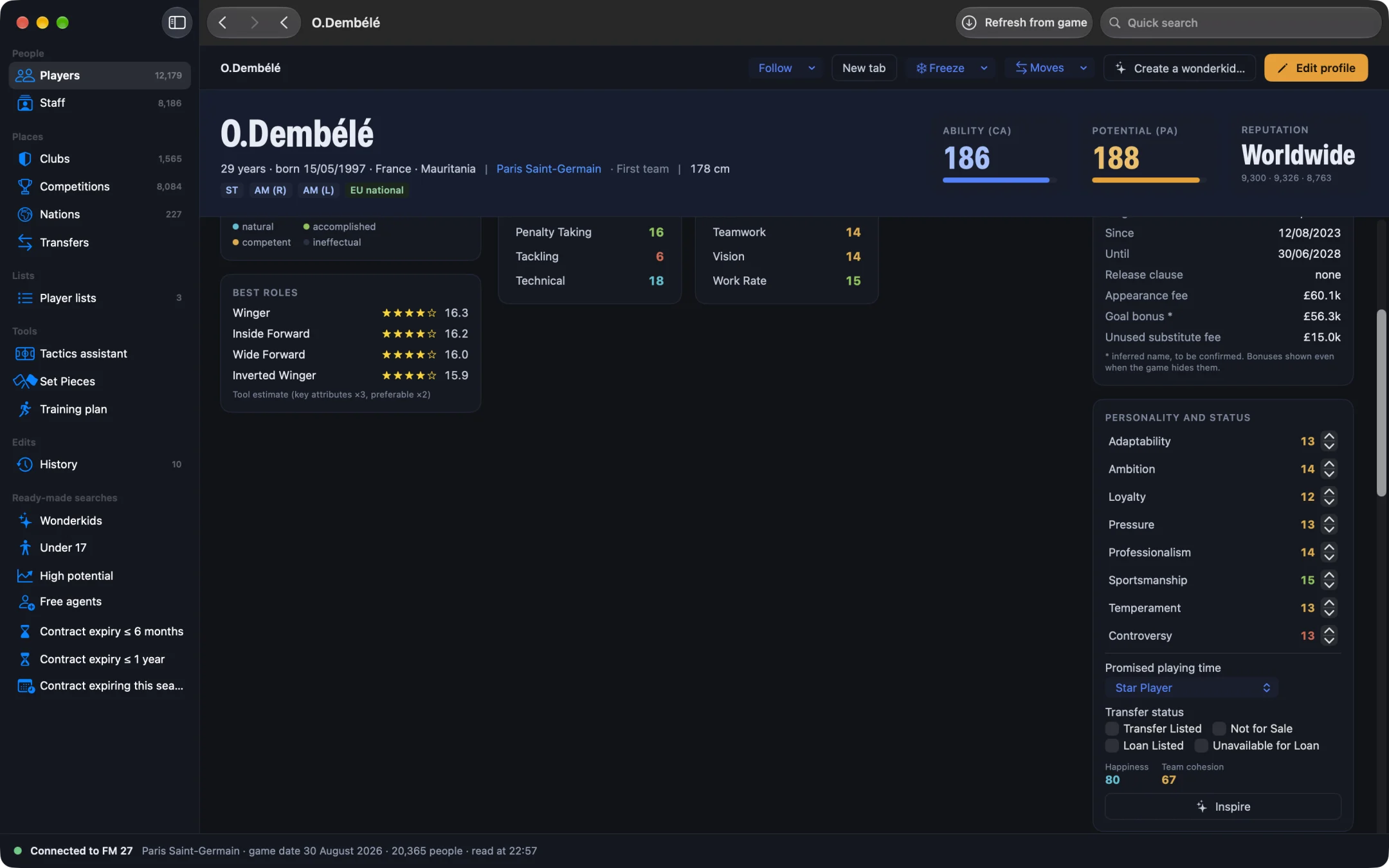
- Open the player's profile and scroll down to the “Personality and status” card.
- Check the indicators: “Happiness” (from −100 to 100), “Team cohesion” (from 0 to 100) and, if he has any, the number of “Concerns”.
- Click “Inspire”.
The message confirms it: the player is inspired, concerns closed, morale, happiness and cohesion maxed out. On our test save, a player's concerns were indeed closed, and the batch was then undone cleanly.
Why not just raise happiness?
Because FM 27 recalculates happiness on its own. While a concern is active, the game pulls happiness down; otherwise it sets it from the player's morale. So low happiness with no concerns comes from morale, while a concern points to a specific grievance. A value written on its own would not stick. So “Inspire” does three things in order:
- it closes active concerns, the same way the game does when it resolves them itself;
- it sets morale to 20;
- it sets happiness to 100, then cohesion with the club to 100 when the card shows it.
“Inspire” works one player at a time. To lift the whole squad's morale at once, use “Max morale for the squad” from the club profile: see heal injuries and restore fitness in FM27.
How do you change a player's transfer status?
- In the “Personality and status” card, under “Transfer status”, tick or untick “Transfer Listed”, “Not for Sale”, “Loan Listed” or “Unavailable for Loan”.
- Click “Apply to game”.
The boxes rule each other out in pairs: ticking “Not for Sale” clears “Transfer Listed”, ticking “Unavailable for Loan” clears “Loan Listed”. The status is written directly: unlike the game's own menu, no news item is created. Tested on our save: “Not for Sale”, then undone.
How do you change promised playing time?
The “Promised playing time” menu offers the game's statuses: “Star Player”, “Important Player”, “Regular Starter”, “Squad Player”, “Impact Sub”, “Fringe Player”, “Emergency Backup”, “Breakthrough Prospect”, “Future Prospect”, “Youngster”, the four goalkeeper statuses and “Surplus to Requirements”. Pick one, then click “Apply to game”.
Can you edit a player's personality in FM27?
Yes. The card lists his 8 traits: “Adaptability”, “Ambition”, “Loyalty”, “Pressure”, “Professionalism”, “Sportsmanship”, “Temperament” and “Controversy”. Each goes from 1 to 20 with the − / + buttons (0 to 20 for controversy, where lower is better). A changed value shows as “old → new” on a coloured background.
The “Apply to game” button shows how many changes are pending and writes them all as one batch; “Cancel” drops everything without touching the game. Determination is not one of these traits: it is a mental attribute, on the player's profile.
How do you undo these changes?
Each “Apply to game” and each “Inspire” is one batch in History. “Undo batch” puts personality, promised playing time, transfer status, morale, happiness and cohesion back to their previous values. Only the closing of concerns stays: it is marked “Can't be undone”. Full details in undo an edit in FM27.
FM 27 may keep showing the old values: save and reload your save to see the new ones. Single-player saves only, and keep a copy of any save you care about.
What you need
Viewing a player's happiness, cohesion and personality is part of the free scouting. Writing to the game needs a licence: €6.99 once for FM27, on up to 3 Macs (see pricing and the FM27 Mac editor comparison). To act on a whole group, also read FM27 mass edit: change your whole squad at once.
Questions
How do I make an unhappy player happy in FM27?
With MacLibero RT on a Mac: open his profile, go to the “Personality and status” card and click “Inspire”. His concerns are closed, his morale goes to 20, his happiness to 100 and his cohesion to 100.
Can I set a player to “Not for Sale” without going through the game?
Yes: under “Transfer status”, tick “Not for Sale” (or “Transfer Listed”, “Loan Listed”, “Unavailable for Loan”), then click “Apply to game”. The change can be undone from History.
Can I edit a player's personality in FM27?
Yes: his 8 traits (adaptability, ambition, loyalty, pressure, professionalism, sportsmanship, temperament, controversy) go from 1 to 20 in the “Personality and status” card. Determination is a mental attribute, not one of them.
Can “Inspire” be undone?
Yes for morale, happiness and cohesion: “Undo batch” in History puts them back. Closed concerns stay closed, just as when the game resolves them itself.
Do I need a licence?
Yes to write to the game: €6.99 once for FM27, on up to 3 Macs. Viewing a player's happiness, cohesion and personality stays free.